
anMoney Budget & Finance PRO - Get APK
You'll be able to download in few seconds.
Publisher Description
~~~ SALE ~~~ up to 66%
Would you believe there could be a personal finance checkbook and budget app on your phone as powerful as Microsoft Money or Quicken on the desktop?
!! Try us risk free — now with a 1 week money back guarantee — we stand behind our product !! — see the end of this section for details.
“…you are getting a fantastic, powerful application that does a terrific job of helping you get your finances in order.” — 2011 Android App Guide: http://goo.gl/o9527
Some of the many features:
✓ Works great on the Nexus 7 and other 7" tablets
✓ Reads your MS Money / Quicken / SPB Finance / Cash Organizer export files. (QIF, OFX)
✓ Full featured and flexible budgeting (yearly, monthly, weekly, biweekly). Forecasting features make your cash flow easy to visualize
✓ 4 widgets for quick and easy data entry and one-glance access to your budget and upcoming bills
✓ Recurring bills/deposits with many different schedules, including biweekly pay checks. Reminders can be set right into your device's calendar
✓ Split transactions for more accurate budgeting and reporting
✓ Privacy with password/PIN security
✓ Never worry about your data with automatic backups on a customizable schedule
✓ Two-level editable categories and optional classifications (projects)
✓ Colorful reports and charts with drill-down (exportable to PDF, CSV or as a web-page)
✓ Customized reports can be saved for easy reuse
✓ Multi-currency with historical exchange rate support for accurate Net Worth calculations
✓ Your data can be exported to standard QIF or CSV
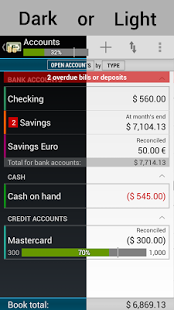
✓ Beautiful modern user interface
✓ Integrated with MyBackup Pro
✓ … and much more …
Explanation of the various permissions and why they are needed:
Permission: Your personal information, add or modify calendar events and send email to guests, read calendar events.
Purpose: Used for creating bill reminders in the phone's calendar.
Permission: Read contact data, write contact data
Purpose: Used when importing/exporting payees to and from the phone's contact list.
Permission: Storage, modify/delete SD card contents
Purpose: Uses to back-up books and import/export QIF/OFX files
Permission: System tools, prevents phone from sleeping
Purpose: For the few seconds while the auto backup and recurring transaction enter happens, keeps the phone from going to standby mode to prevent potential data loss.
Permission: Your accounts, discover known accounts
Purpose: Used when importing/exporting payees to and from the phone's contact list. The list of accounts on the phone is read and you are given the option to pick the account used for contact operations.
Permission: System tools, automatically start at boot
Purpose: Starts the alarm timer that performs the auto backup and recurring transaction enter functions. No processing intensive tasks are performed at this time.
Permission: Network communication, Market license check
Purpose: Used to perform the Android Market license verification.
Money-back guarantee details:
You have 7 full days to get a full and unconditional refund. If you are past the 15 minute refund window offered by the Google Play Store, contact us (android.money@gmail.com) for a refund which will be given in at most 8 hours.
finance, double entry, accounting. bookkeeping, checkbook, MS Money, Quicken, budget, expense, income
About anMoney Budget & Finance PRO
The company that develops anMoney Budget & Finance PRO is anMONEY (Pte) Ltd. The latest version released by its developer is 1.0 .
To install anMoney Budget & Finance PRO on your Android device, just click the green Continue To App button above to start the installation process. The app is listed on our website since 2014-11-01 and was downloaded 0 times. We have already checked if the download link is safe, however for your own protection we recommend that you scan the downloaded app with your antivirus. Your antivirus may detect the anMoney Budget & Finance PRO as malware as malware if the download link to com.zvasvari.anmoneyp is broken.
How to install anMoney Budget & Finance PRO on your Android device:
- Click on the Continue To App button on our website. This will redirect you to Google Play.
- Once the anMoney Budget & Finance PRO is shown in the Google Play listing of your Android device, you can start its download and installation. Tap on the Install button located below the search bar and to the right of the app icon.
- A pop-up window with the permissions required by anMoney Budget & Finance PRO will be shown. Click on Accept to continue the process.
- anMoney Budget & Finance PRO will be downloaded onto your device, displaying a progress. Once the download completes, the installation will start and you'll get a notification after the installation is finished.
Program Details
System requirements
Download information
Pricing
Version History
version
posted on 2014-11-01
- Android 5.0 (Lollipop) support.,- Back pressing now opens the Account List screen and a second press takes you out of the app.,- European Portuguese translation. (Thanks, Leandro!),- Many bug fixes and internal changes.,- The Category reports can display transfers now. One of the accounts in the transfer must NOT be part of the report for the transfer to show up.,- The Category List screen allows changing the display direction.
version 1.5.3.20110503
posted on 2011-05-04
Several fixes and updates
Disclaimer
External Download
We do not host anMoney Budget & Finance PRO on our servers. We did not scan it for viruses, adware, spyware or other type of malware. This app is hosted by Galad and passed their terms and conditions to be listed there. We recommend caution when installing it.
The APK Download link for anMoney Budget & Finance PRO is provided to you by apps112.com without any warranties, representations or guarantees of any kind, so access it at your own risk.
If you have questions regarding this particular app contact the publisher directly. For questions about the functionalities of apps112.com contact us.
